# AeroFetch
**A clean, native-feeling video & audio downloader for Windows — a friendly front-end for [yt-dlp](https://github.com/yt-dlp/yt-dlp).**
Paste a link, pick a quality, and go. No command line, no Python setup, no chasing down FFmpeg — everything is bundled.
---
## What it is
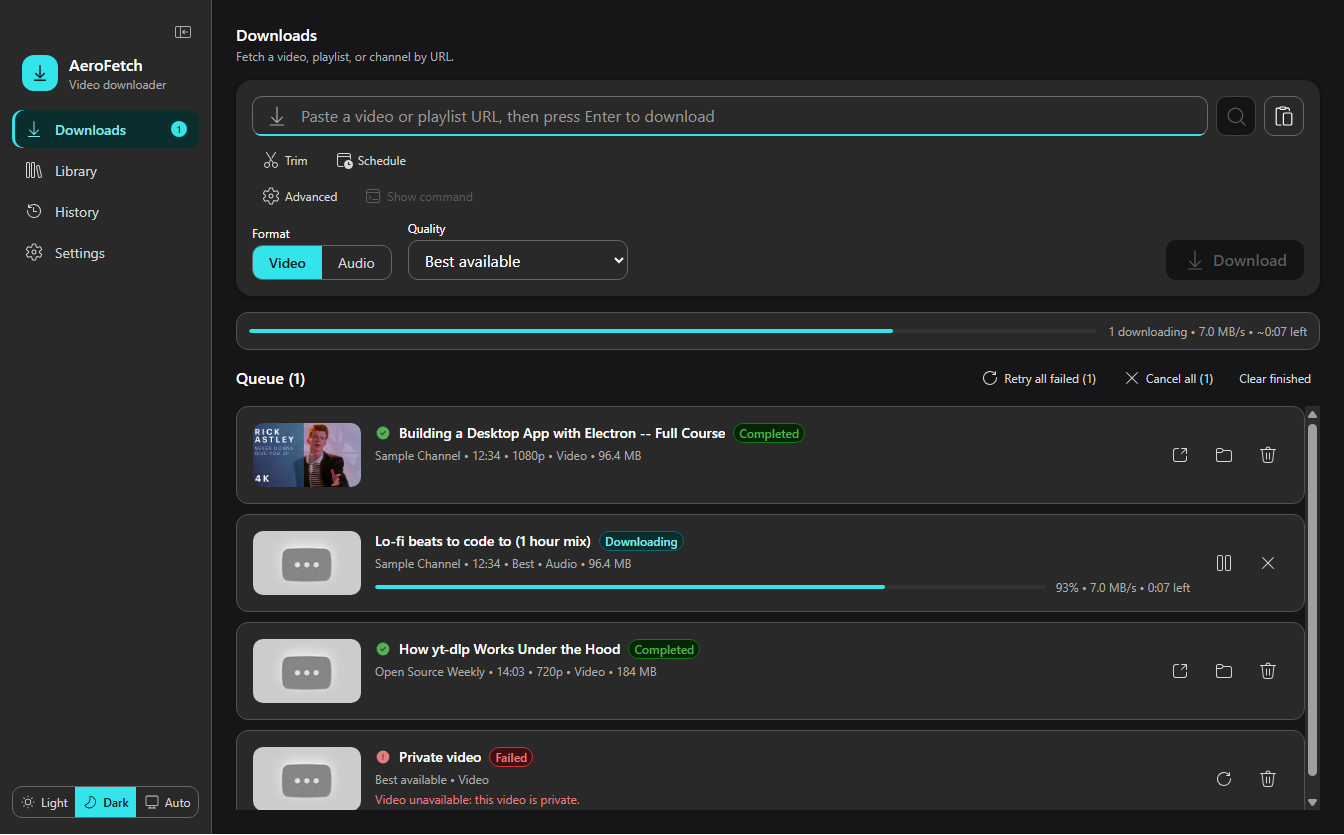
AeroFetch wraps the power of yt-dlp in a modern Windows desktop app. It handles single videos, whole playlists, and watched channels; it can grab audio-only, embed thumbnails and metadata, trim clips, skip sponsor segments, and keep a library of channels in sync — all from a point-and-click interface built with Fluent UI.
It ships as a **regular installer** *and* a **single portable `.exe`** (no admin rights required), with `yt-dlp`, `FFmpeg`, and `aria2c` bundled in — so it runs on a fresh machine with nothing else installed.
## Features
- **One-paste downloads** — drop in a video or playlist URL and press Enter. Clipboard detection can offer the link automatically.
- **Format & quality control** — pick a resolution/codec (H.264 / VP9 / AV1), or extract audio to MP3, M4A, Opus, FLAC, WAV, or AAC.
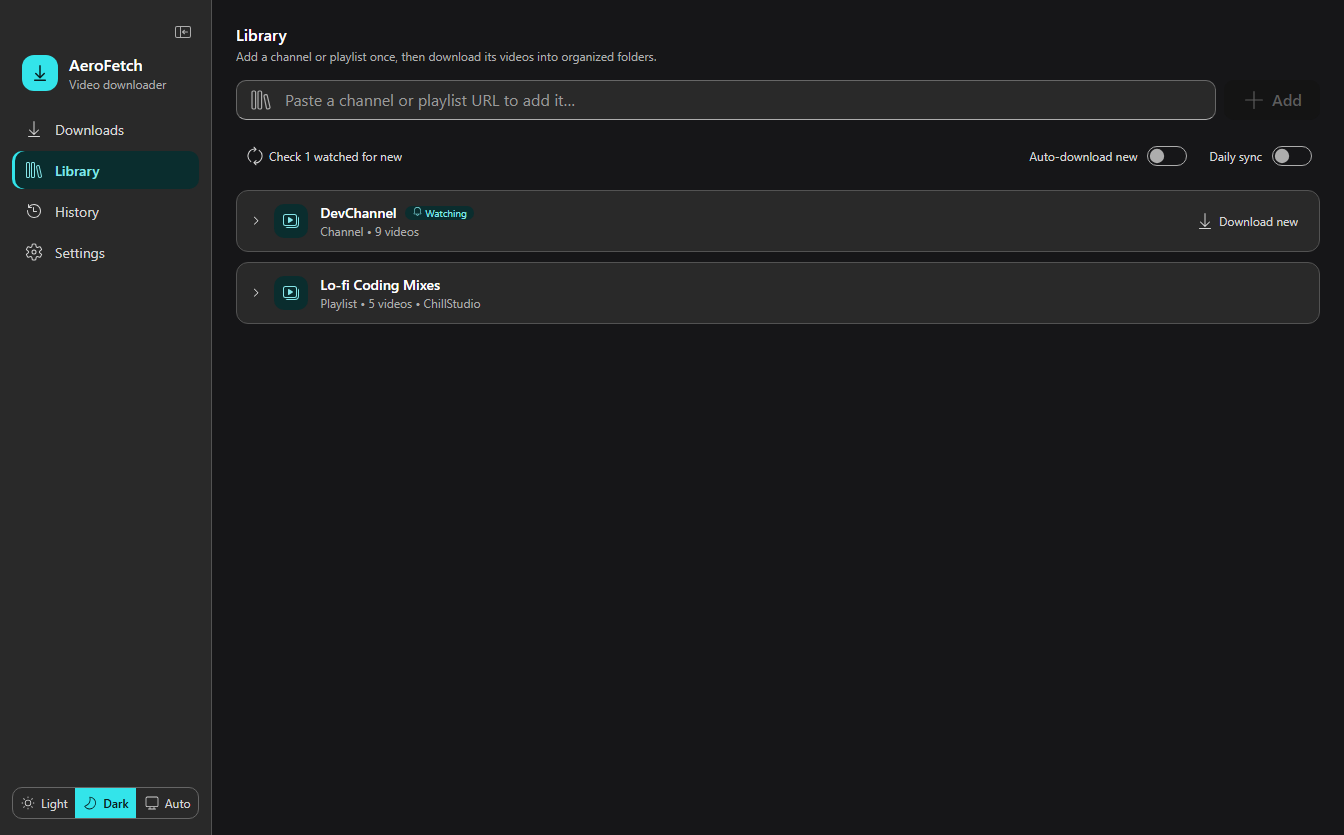
- **Playlists & channels** — select which videos to grab, or add a channel to your **Library** and let AeroFetch watch it for new uploads.
- **Post-processing** — embed thumbnails, metadata, chapters, and subtitles; **SponsorBlock** to skip or mark sponsor segments; trim to a start/end timestamp.
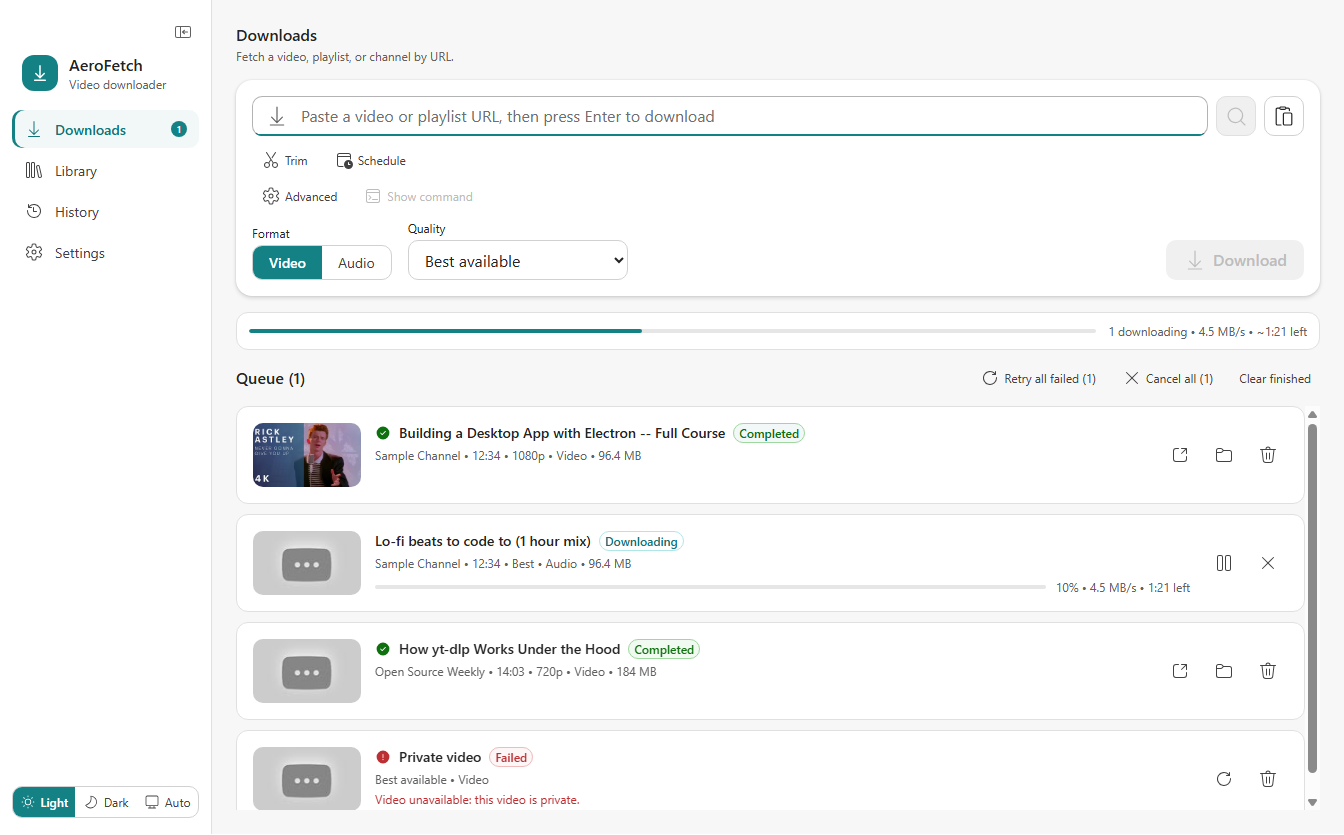
- **Queue that behaves** — concurrent downloads with a configurable cap, pause/resume, cancel, retry-all, and live speed/ETA.
- **Library & sync** — organized per-source folders, scheduled daily sync, retention rules, and quality-upgrade selectors.
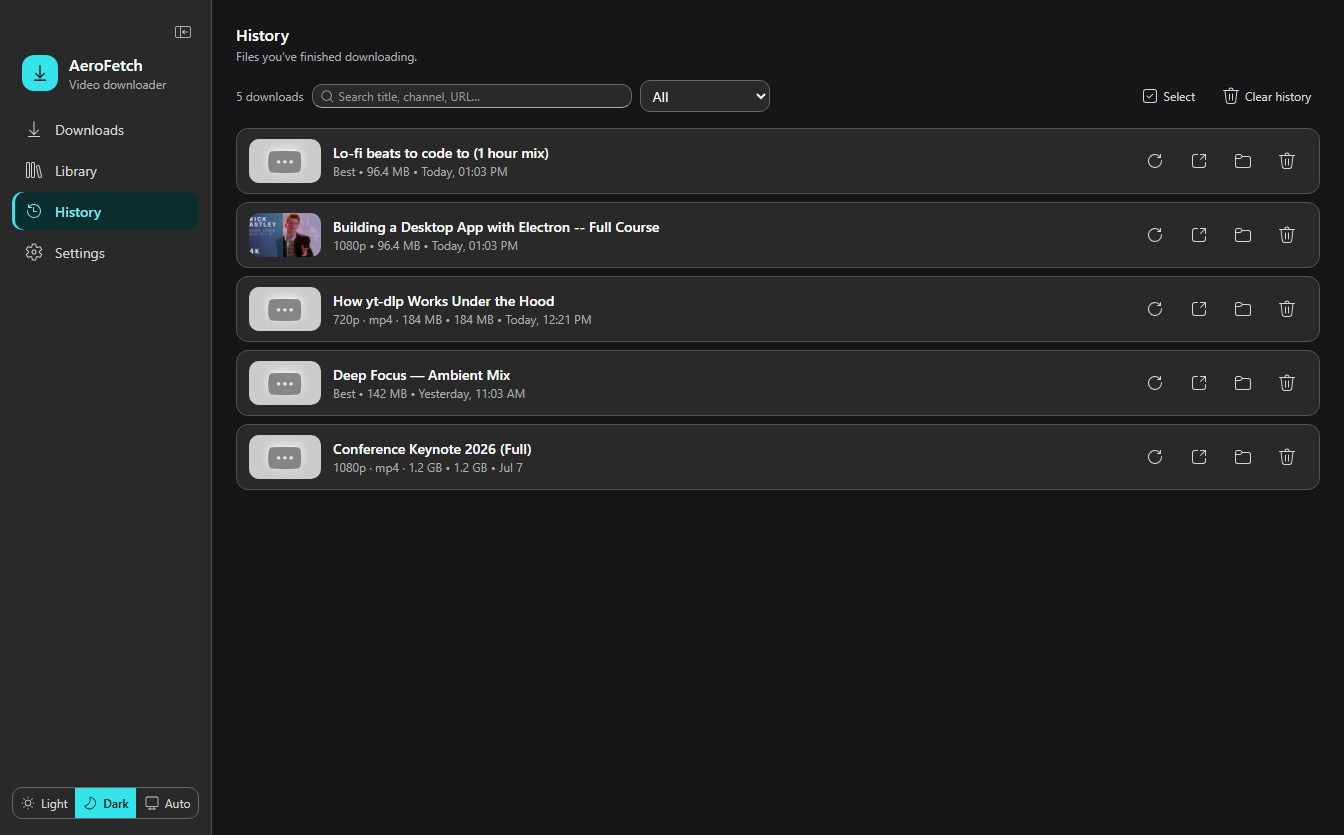
- **History** — searchable, filterable record of everything you've downloaded, with quick open-file / show-in-folder / re-download.
- **Fast & convenient** — `aria2c` acceleration, a `Ctrl+K` command palette, light / dark / auto themes, and native Windows notifications.
- **Portable-friendly** — runs from a USB stick or Downloads folder without installing or needing admin rights.
## Screenshots
| Downloads (light) | Downloads (dark) |
| :---: | :---: |
|  |  |
| Library — watched channels & playlists | History — searchable & filterable |
| :---: | :---: |
|  |  |
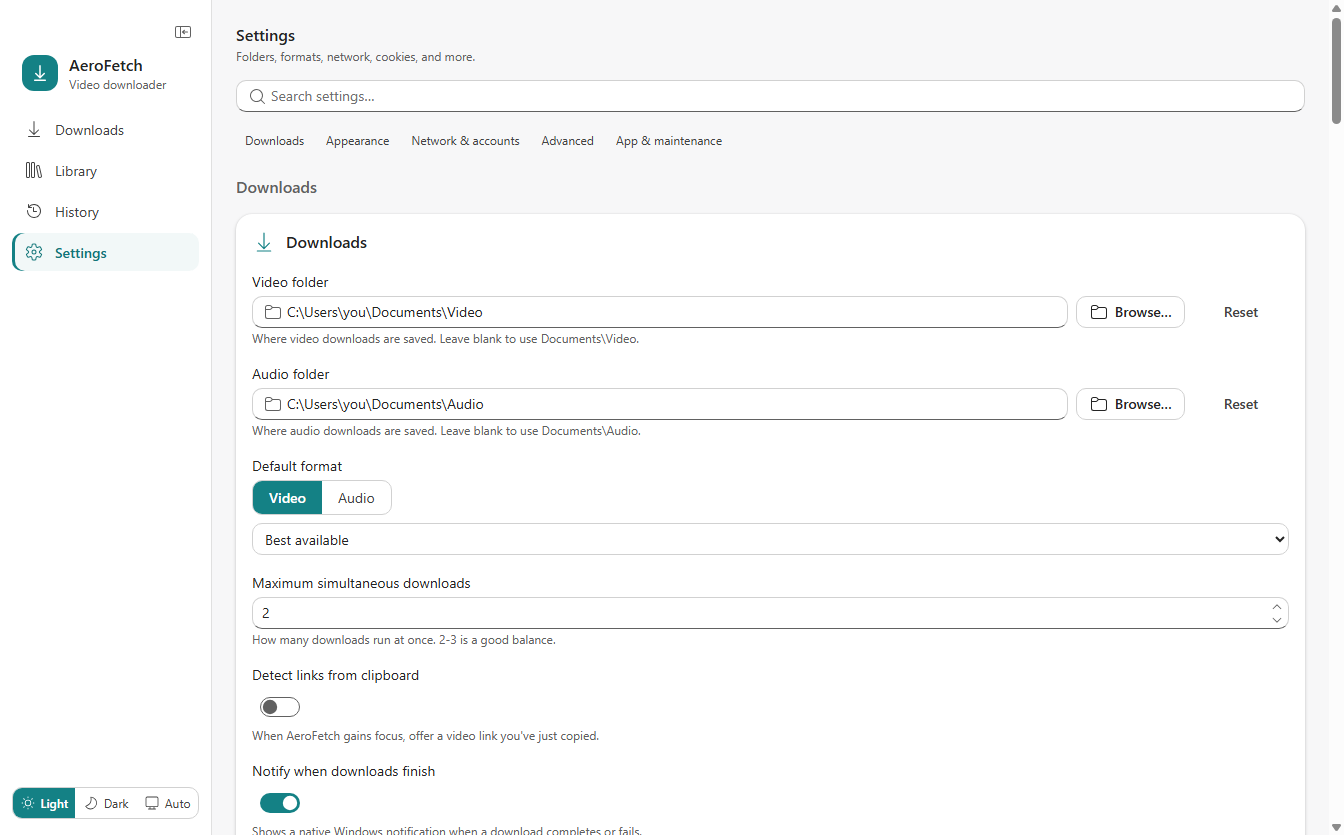
**Settings — grouped & searchable**
## Download & install
Grab the latest build from the [**Releases**](https://github.com/debont80/AeroFetch/releases) page:
- **`AeroFetch Setup .exe`** — standard installer. Installs per-user (no admin), adds a Start-menu shortcut, and auto-updates.
- **`AeroFetch--portable.exe`** — single self-contained executable. No install, no admin; keeps its data in an `AeroFetch-data` folder beside the `.exe`. Ideal for locked-down or shared PCs.
Each release also publishes a `.sha256` next to every executable so you can verify the download.
> Because the executables aren't code-signed, Windows SmartScreen may warn on first launch — choose **More info → Run anyway**. No administrator rights are required either way.
## Build from source
Requires **Node.js 24.x**.
```bash
git clone https://github.com/debont80/AeroFetch.git
cd AeroFetch
npm install
npm run dev # launch the app in development
npm run ui # preview just the renderer in a browser (http://localhost:5173)
npm test # run the test suite
npm run build:win # produce the installer + portable .exe in dist/
```
The bundled `yt-dlp.exe`, `ffmpeg.exe`, `ffprobe.exe`, and `aria2c.exe` live in `resources/bin/` and are packaged automatically.
## Tech stack
Built with **Electron** + **electron-vite** + **electron-builder**, a **React 19** / **TypeScript** renderer, **Fluent UI**, **Zustand** for state, and **Zod** for boundary validation. yt-dlp runs only in the main process; the renderer talks to it over a typed IPC bridge with context isolation enabled.
## A note on responsible use
AeroFetch is a tool for downloading media you have the right to download — your own uploads, content offered for download, or material whose license permits it. Respect the terms of service of the sites you use and the rights of content creators.
## License
AeroFetch's own source code is released under the [**MIT License**](LICENSE) — free to use, modify, and redistribute.
It also bundles third-party binaries that remain under their own licenses: **yt-dlp** (Unlicense), **FFmpeg** (LGPL/GPL), and **aria2** (GPL). AeroFetch invokes these as separate executables rather than linking against them, so they are distributed as an aggregate; their licenses apply to the respective files in `resources/bin/`.